Table of Contents
Millions use Zoom every day, but imagine sitting down to join an important video call, only to realise minutes later that your computer is acting strangely and you have been hacked. This is the reality many people face with a phishing Zoom link. So let’s explore in this article what the phishing Zoom call scam is and how to stay safe.
Before we continue, I would like to add that in most of these video meeting scams, the problem is not due to a bug/vulnerability in the official Zoom app or website, but scammers are targeting Zoom through a fake, phishing look a like link.
What are phishing Zoom Call Scams?
Simply put, phishing Zoom call scams are fake video call invitations or messages that pretend to be from Zoom or someone you trust, but are designed to trick you.
Scammers might send an email saying you have missed a meeting or that your Zoom account has been hacked, prompting you to click a link that looks real but isn’t. Once you click, you might be taken to a fake login page that steals your username and password or downloads harmful software onto your device.
Most common is that they would ask you to join a Zoom call from a phishing link (look-alike website with a few character differences). If you join the call, you will see their video, which is also not a real live video but a deep fake video, and you will not hear their voice. They will ask in chat, “We cannot hear you, maybe it is an issue from your Zoom, try updating it and rejoin the call.” Once you download and install it from their link, they will get remote access to your system, which will give them access to your data, passwords, etc. In case you or anyone in your network installs such software, one solution would be to disconnect your laptop from the internet to cut access and format/hard reset your operating system.
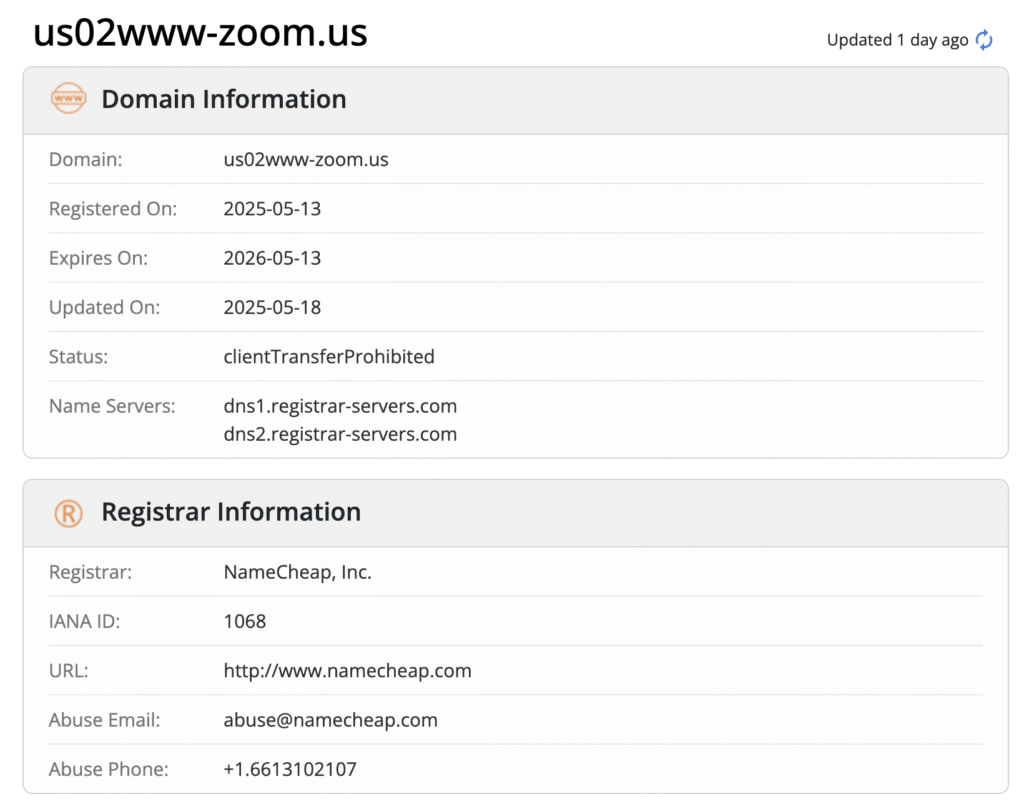
You can see in the image below, Domain us02www-zoom.us, created in May 2025 and registered through NameCheap. Domains like this are often designed to look almost identical to Zoom’s official web address, tricking users into believing they are clicking a safe meeting link. Scammers use such lookalike domains to send fake Zoom invitations, aiming to steal login details or launch malware attacks. The fact is that this domain was registered recently, which is a red flag, and you can check this using Whois.
Using tools like ScamBuzzer, you can also save yourself. This tool detects phishing sites and blocks such fake Zoom call links

Real stories of people:
- Daavya Vaishnav shared how scammers contacted her claiming to be part of the Avalanche team and expressed interest in organising a side event at Token2049. They reached out to her through Telegram groups and fake Zoom meeting invites, pretending to be trusted community members to gain her trust. The scammers aimed to trick her and others into clicking harmful links or sharing sensitive information.
Check out the thread she shared:
- Sagar Jethi recently shared how he was targeted by scammers on Telegram when an old contact, Zhixi Zhang (known as @build_on_bob), sent him a Zoom meeting link that turned out to be fake and part of a scam. Sagar suspects the Telegram account of this well-known marketing head might have been hacked or compromised by scammers
Check out his tweet:
- @chainyoda had their main Twitter handle hacked through a social engineering scam linked to a fake “Bloomberg interview”.
He shared this on X:
- Kaavya almost became a victim of a phishing Zoom scam involving deepfake technology. Someone she knows personally sent her a seemingly friendly message and a Calendly link to set up a catch-up call. But when the call started, instead of Google Meet, she was sent a Zoom link to a “team meeting,” which felt strange. On the Zoom call, she saw a deepfake video of Polygon’s founder, Sandeep Nailwal, and another person, moving and looking very real. Realizing this was a trick, she left immediately and asked to switch on Google Meet call. The scammer then disappeared, blocking her and erasing their profile.
Check out this thread:
Types of Zoom Call Scams
There are a few common tricks scammers use:
Fake Meeting Invitations: Emails or messages that tell you a meeting is scheduled or missed, containing malicious links.
Phishing Login Pages: Fake Zoom sign-in pages that steal your username and password.
Malicious Software Updates: Scam links pretending to be Zoom updates that install malware.
Account Compromise Alerts: Emails claiming your Zoom account is hacked, prompting you to reset passwords on fake sites
How to spot fake Zoom Scam Calls:
- The email doesn’t come from an official Zoom email address but from a weird or suspicious one.
- The email displays a link that, when hovered over, shows a strange or unrelated web address.
- The message pushes you to act immediately, playing on your fear or urgency.
- The email claims you missed a meeting you didn’t know about, or asks you to download updates directly from links.
- In the call you can see but cannot hear their voice so they ask you, “Maybe you need to update Zoom”
- Strange Meeting Links, If the link doesn’t match the official company domain, don’t click.
- If they are offering an investment return that seems impossible or a prize you didn’t enter for, it’s likely a scam.
Zoom Call Security Best Practices
- Only click meeting links from trusted sources.
- Whenever possible, open your Zoom app directly and enter the meeting ID instead of clicking a link.
- Keep your Zoom software updated by opening the app yourself, not through email links.
- Check the sender’s email address carefully.
- When in doubt, contact the person who supposedly sent the invite via another method to confirm.
- Use two-factor authentication for your Zoom account.
- Only enter login credentials in the official Zoom site, which is zoom.us and their official app.
- Do not download or update Zoom software if they told you to do it now, and share the link in the call.
- If something feels wrong, it probably is. Your instincts are usually right. It’s better to be slightly rude and protect yourself than to be polite and get scammed.
Zoom has become an essential tool for connecting people worldwide, but like any popular tool, it attracts scammers looking to exploit trust and convenience. By knowing what phishing Zoom call scams look like and following simple safety steps, you can protect yourself from falling victim. Next time you get that unexpected Zoom invite, pause, look closely, and keep your online meetings secure.
Do check out BlockchainHQ for more articles
Leave a Reply